
Applying Nuxt.js + nuxt-i18n + VeeValidate...
Applying nuxt-i18n to VeeValidate Hmm... The problem I need to solve this time is applying Nuxt's i18n to VeeValidate.. It seems like it will be much harder tha
GGAMI
Applying nuxt-i18n to VeeValidate Hmm... The problem I need to solve this time is applying Nuxt's i18n to VeeValidate.. It seems like it will be much harder tha
Hmm... The problem I need to solve this time is applying Nuxt's i18n to VeeValidate..
It seems like it will be much harder than I expected...
https://qiita.com/keiichi-hikita/items/9d5742f1cc06fd0d5707
https://www.virment.com/how-to-use-veevalidate-nuxtjs/
For now, with nuxt-i18n, a JS file is generated in the Laravel backend and then added..
There are validation messages that are actually used in Laravel too.
At first, I tried to combine the two, but Laravel supports a few more things for rules like min, so it seemed like some modifications would be needed to use them together. In reality, I wasn't skilled enough to use both..
After creating a plugins / vee-validate.js file,
import { extend, configure } from "vee-validate";
import * as rules from 'vee-validate/dist/rules'

configure({

  defaultMessage: (field, values) => {
    // override the field name.
    values._field_ = $nuxt.$t(`fields.${field}`);
    values.attribute = $nuxt.$t(`fields.${field}`);

    return $nuxt.$t(`validation.${values._rule_}`, values);
  }
});

for (let rule in rules) {
  extend(rule, rules[rule])
}
I used it by doing that.
To match Laravel, which uses attribute, I provided that value and translated it with t using nuxt-i18n...
At first, extend was being processed more than once, and because of things that had already been processed, some things weren't applied properly. I wasted a lot of time on that, but in the end, you could say it worked..
But while I was wondering whether to use it as is, I looked into another approach in case I decided to try a different way.
https://logaretm.github.io/vee-validate/examples/i18n.html#localize-api
import en from 'vee-validate/dist/locale/en.json'
import ko from 'vee-validate/dist/locale/ko.json'
import ja from 'vee-validate/dist/locale/ja.json'

// Install English and Arabic localizations.
localize({
  en: {
    messages: en.messages,
    names: {
      email: "Email",
      password: "Password",
      nickname: "Nickname",
    }
  },
  ko: {
    messages: ko.messages,
    names: {
      email: "이메일",
      password: "비밀번호",
      nickname: "닉네임",
    }
  },
  ja: {
    messages: ja.messages,
    names: {
      email: "メール",
      password: "パスワード",
    }
  },
});

let LOCALE = "en";

// A simple get/set interface to manage our locale in components.
// This is not reactive, so don't create any computed properties/watchers off it.
Object.defineProperty(Vue.prototype, "locale", {
  get() {
    return LOCALE;
  },
  set(val) {
    LOCALE = val;
    localize(val);
  }
});
I tried to solve it this way, but it had the drawback that it couldn't be managed directly in one place...
When switching languages with nuxt-i18n, I could call localize to change VeeValidate's language set too, but.....
Hmm... after some thought, I decided to go with the first approach..
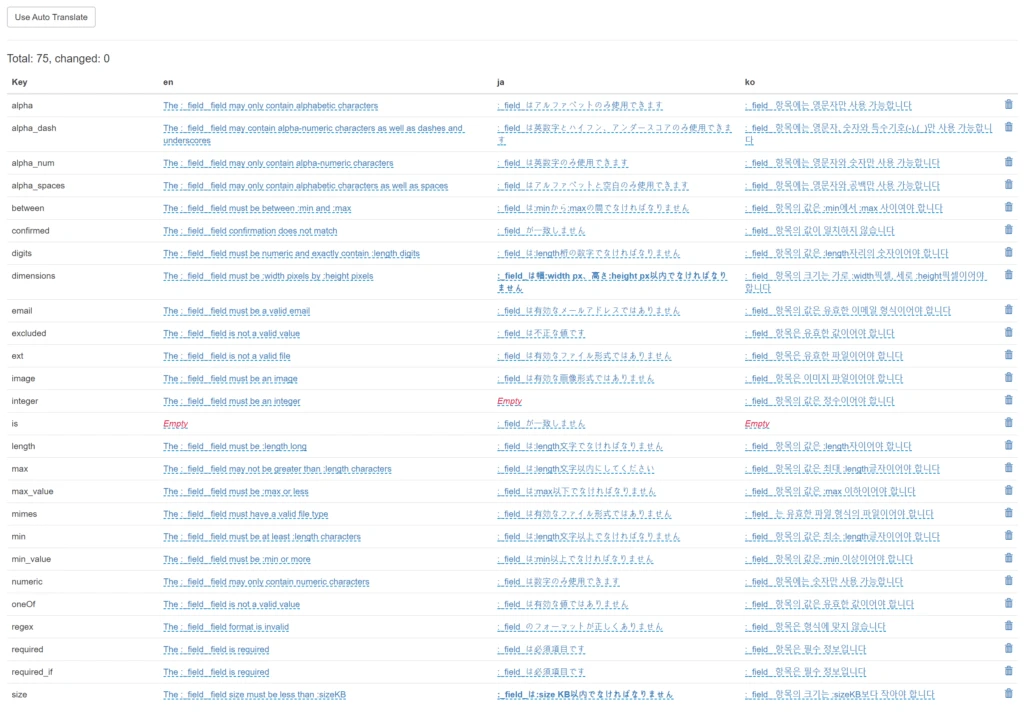
So, I converted the existing en.json, ko.json, and ja.json files into Laravel lang files and saved them..
But here, it says the size of the item must be less than :sizeKB. It should just be :size here, though...
A problem occurs where :sizeKB gets processed as {sizeKB}...
I guess I'll have to look into this and fix it later...
Honestly, I don't really know what the right way is...
For now, it's only been a few days since vee-validate 3.0 was released,
so I still don't know whether the way I did it is actually correct...
But since it works for now, I guess I'll move on..I hear Vue 3 is coming out later too.. Anyway,, I'll just move on this way for now..
Next time I completely overhaul it, I'll try to do it in more detail..
For now, I'm not skilled enough, and it seems like doing anything more would take too much time, so I'll just leave it at that