
Applying Prettier, Blade, and Tailwind CSS to Laravel
There are times when you need to apply Blade, Prettier, and Tailwind CSS to a Laravel project. I got to use Prettier alongside ESLint in NativeScript and fronte
GGAMI
There are times when you need to apply Blade, Prettier, and Tailwind CSS to a Laravel project. I got to use Prettier alongside ESLint in NativeScript and fronte
Contents
There are times when you need to apply Blade, Prettier, and Tailwind CSS to a Laravel project.
I got to use Prettier alongside ESLint in NativeScript and frontend projects, and while using it, I thought it was really great, and I think it's an essential tool in React Native as well.
So, here's how to do it.
npm install -D prettier prettier-plugin-blade prettier-plugin-tailwindcss{
"printWidth": 120,
"singleQuote": true,
"trailingComma": "all",
"tabWidth": 2,
"semi": true,
"useTabs": false,
"bracketSpacing": true,
"arrowParens": "always",
"endOfLine": "auto",
"plugins": [
"prettier-plugin-blade",
"prettier-plugin-tailwindcss"
],
"overrides": [
{
"files": [
"*.blade.php"
],
"options": {
"parser": "blade"
}
}
]
}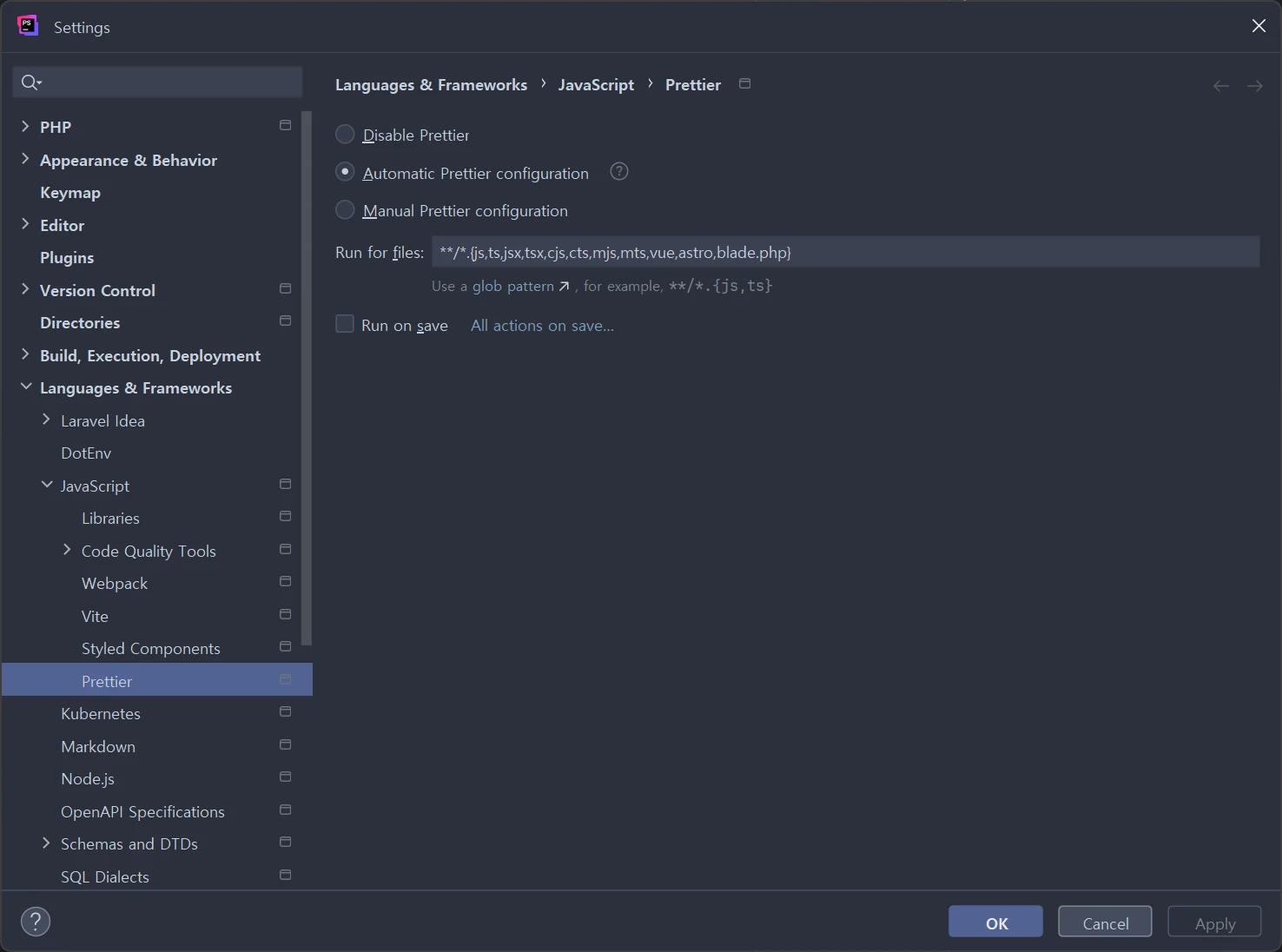 As shown in the image, search for
Prettier and add blade.php.
**/*.{js,ts,jsx,tsx,cjs,cts,mjs,mts,vue,astro,blade.php}
When you simply reformat with Ctrl + Alt + Shift + L, Prettier will handle it automatically.
Before
<div>
    <div class="font-bold text-2xl">hello world</div>
    <div class="font-semibold text-xl text-green-500">tailwindcss v4</div>
</div>
After
<div>
    <div class="text-2xl font-bold">hello world</div>
    <div class="text-xl font-semibold text-green-500">tailwindcss v4</div>
</div>
This reorders the Tailwind CSS classes in *.blade.php.
You might think this isn't all that important, but when you're working on design and development, this order seems to have a significant impact on how quickly you can work.
Going forward, it seems best to make sure to use Prettier and ESLint as essential tools in every project.
For reference, this Prettier setup doesn't work in VS Code. LOL, seriously ㅡ..ㅡ;;
You need to install the plugin above. (When installing it alone, an ES module error occurs, so I'm not sure whether it gets applied or not.)
npm install -D @shufo/prettier-plugin-blade{
"plugins": [
"prettier-plugin-blade",
"prettier-plugin-tailwindcss",
"@shufo/prettier-plugin-blade"
],
"overrides": [
{
"files": [
"*.blade.php"
],
"options": {
"parser": "blade"
}
}
],
"printWidth": 120,
"tabWidth": 2,
"useTabs": false,
"sortTailwindcssClasses": true,
"sortHtmlAttributes": "none",
"noPhpSyntaxCheck": false,
"indentInnerHtml": true,
"extraLiners": "",
"trailingCommaPHP": true,
"componentPrefix": "x-,livewire:"
}In VS Code, install the formatter above.
settings.json
// formatter
"[blade]":{
	"editor.defaultFormatter": "shufo.vscode-blade-formatter"
},
"bladeFormatter.format.sortTailwindcssClasses": true,
"bladeFormatter.format.wrapLineLength": 120,
"bladeFormatter.format.indentInnerHtml": true,
Set it up like this.
Then you'll be able to use the same Prettier setup in both PhpStorm and VS Code.