
Installing the New Image Plugin reSmush.it Image Optimizer
Hmm... Since I couldn't use the Litespeed image plugin, I had to find a new image compression plugin... So, before using Litespeed—in other words, I reinstalled
GGAMI
Hmm... Since I couldn't use the Litespeed image plugin, I had to find a new image compression plugin... So, before using Litespeed—in other words, I reinstalled
Hmm... Since I couldn't use the Litespeed image plugin, I had to find a new image compression plugin...
So, before using Litespeed—in other words, I reinstalled the plugin I had been using before.

Install it. Right now...
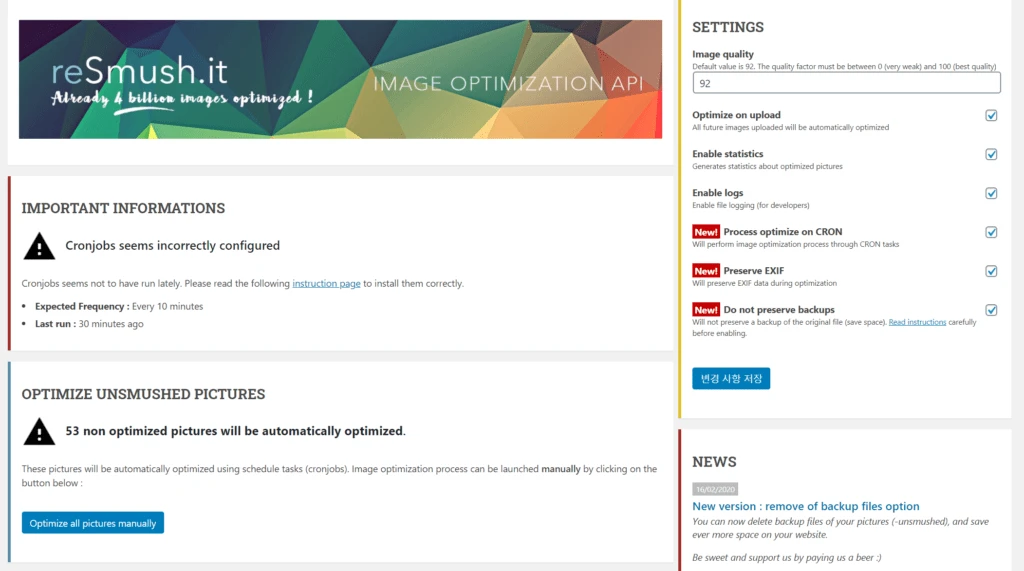
I set the settings like this.
You can turn off the Enable logs option in the middle.
Oh, I just noticed... You can also turn off the Optimize on upload option..
The reason is that image compression is run using CRON.
This was my first time customizing the default base docker image, but I had to add cron somehow.
But running cron separately through supervisord seemed like overkill... so I just created a dockerfile and put it in there.
I'll write about the Dockerfile for adding Cron to the Docker Hub Wordpress Image in the next post... (Right now, I'm eagerly waiting to see whether Cron is running properly... Please, let it work without any problems!!)