Because of this, I think I spent at least 24 hours in total... I thought it was a problem with the nginx configuration, so I kept changing it and changing it again... but it still wouldn't work... I set up a test environment, changed the settings one by one, reinstalled everything, and kept repeating the process... So I want to explain the conclusion I eventually reached.
A problem occurs where containers cannot connect to the host.#
After installing Docker on CentOS 8 or Fedora, try running the following commands:
It doesn't work.
Apparently, this happens because of some issue with the host between containers (?) Anyway,
here's the link I found.
https://ahelpme.com/linux/centos-8/firewalld-and-podman-or-docker-no-internet-in-the-container-and-could-not-resolve-host/
This fixed it for me. In fact, dnf install works without any problems, and so does nslookup.
masquerade: yes is set to yes.
And connections between containers and the host work fine too... But,,, there's just one thing,,, one thing,, one thing !!!!!!!!!!!!!!!!!
A problem where nginx and traefik cannot get x-real-ip.#
Even if you configure nginx.conf to get x-real-ip,
when using traefik, it's impossible to get X-REAL-IP.
Even when it does come through, you always get the Docker network IP, such as "172.19.0.1".
First solution#
This method involves editing "etc/firewalld/firewalld.conf".
Change FirewallBackend=nftables
to FirewallBackend=iptables.
Second solution#
Apply it using the commands.
With this, connections work without any problems when running dnf install host or anything else during a docker build. But!!
If your docker-compose service is set up with a separate network, such as frontend or backend, you must also add that network to the trusted zone.
Otherwise, when using traefik, you'll get an error like the following.
So, as shown above, you just need to add that interface as well.
Once you do this, X-REAL-IP will come through correctly.
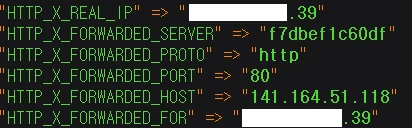
It seems this problem occurs because Docker does not support nftables..
Anyway... I hope support is added and this is officially fixed in the future.
For now... I'm glad I was able to fix it this way.
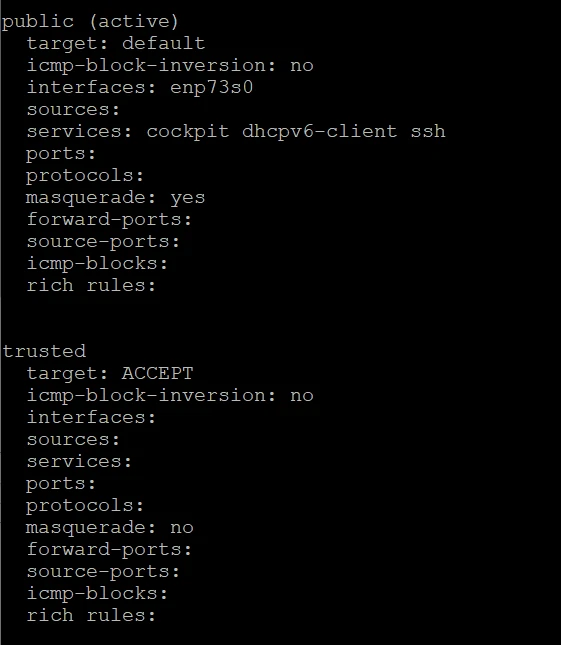
firewall-cmd --permanent --zone=public --add-masquerade
when applied using this command

I think applying it this way should work.
https://github.com/docker/for-linux/issues/955
